
TL;DR
Lingokids vs YouTube Kids comes down to interactive, ad-free, curated fun versus a free, enormous video library. Lingokids gives you hand-picked, ad-free content for ages 2 to 8 that kids tap and play with, plus offline play with Lingokids Plus and no endless autoplay. YouTube Kids is free and has huge variety, but it shows ads and leans on algorithmic recommendations.
At a Glance
| Lingokids | YouTube Kids | |
|---|---|---|
| Ads | None | Yes (ads outside YouTube Premium) |
| Autoplay | No endless autoplay | Autoplay on by default (can be turned off) |
| Content | Curated, hand-picked | Algorithmic, uploaded by many creators |
| Interactive vs passive | Interactive: games and activities | Mostly passive video watching |
| Works offline | Yes, with Lingokids Plus (download first) | Limited (offline needs Premium) |
| Designed age range | 2 to 8 | Broad (roughly under 13, split by age settings) |
| Parental controls | Yes | Yes |
| Price | Free tier plus paid subscription | Free (Premium removes ads) |
Lingokids vs YouTube Kids: What’s the Real Difference?
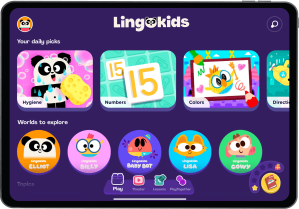
The core difference between Lingokids and YouTube Kids is what your child actually does while using them. Lingokids is an interactive entertainment app where kids play games, sing along, and tap through activities inside a walled, ad-free space built for ages 2 to 8. YouTube Kids is primarily a video-watching app: a huge, free catalog served up by an algorithm, with ads for most families. Both are made for children, but one is a playground and the other is a TV channel with a very deep library.
How do ads compare?
Lingokids shows no ads at all, while YouTube Kids includes ads unless you pay for YouTube Premium. For a lot of parents, this is the single biggest deciding factor. Ads interrupt play, they push products at kids who can’t tell content from commercials, and they can send little ones tapping toward things you didn’t plan on. A fully ad-free environment means what your child sees is the content, not a sales pitch wrapped around it.
Autoplay: does the next video just keep coming?
YouTube Kids uses autoplay by default, so one video rolls straight into the next, while Lingokids has no endless autoplay. You can switch autoplay off in YouTube Kids settings, but the default keeps content flowing, which makes it easy for a five-minute break to stretch into forty. Lingokids is built around discrete games and activities that come to a natural stop, so screen time has built-in pause points instead of an infinite feed pulling your kid along.
Curated content vs algorithmic recommendations
Lingokids content is hand-picked and produced or reviewed for a young audience, while YouTube Kids surfaces videos from countless creators through an algorithm. That curation matters because it changes how much you have to supervise. With a curated library, you’re not policing what the recommendation engine decides to show next. YouTube Kids does filter and offers parental controls, but the sheer volume of uploaded content means the occasional odd or off-tone video can slip through, which is why some parents want a more closed environment.
Interactive play vs passive watching
Lingokids is interactive, meaning kids tap, choose, and play, while YouTube Kids is mostly passive watching. This is where the two apps are most different in spirit. Passive video has its place (sometimes you genuinely need your kid parked and quiet for ten minutes), but interactive play keeps little hands and minds busy instead of just staring. If you want screen time where your child is doing something rather than only consuming, an interactive app changes the feel of that time completely.
Does it work offline?
With Lingokids Plus, you can download content and play offline, while YouTube Kids offline viewing requires a Premium subscription. This is a bigger deal than it sounds. Car trips, flights, waiting rooms, and spotty Wi-Fi are exactly the moments you most want a reliable option for your kid. Being able to load up games and activities before you leave the house, with no data and no ads, is one of the most practical wins for busy families.
Age range and fit
Lingokids is designed specifically for ages 2 to 8, while YouTube Kids covers a broad span of childhood with age settings you configure. A tighter age focus means the content, pacing, and interface are tuned for younger kids rather than trying to serve a toddler and a preteen from the same app. If your child is in that 2 to 8 window, a purpose-built experience usually feels more appropriate than a broad one you have to fence in.
Parental controls and price
Both apps offer parental controls, and price is where YouTube Kids has a clear edge: it’s free, while Lingokids offers a free tier plus a paid subscription. YouTube Kids gives you timers, content-level settings, and profiles at no cost. Lingokids’ controls sit inside a smaller, curated, ad-free world, which means there’s simply less to manage. You’re paying for a tighter, ad-free experience rather than filtering a giant free one.
Who Lingokids Is Best For
Lingokids is best for parents of 2 to 8 year olds who want ad-free, interactive screen time they don’t have to hover over. If you’re tired of ads interrupting your kid, uneasy about autoplay pulling them from video to video, or you want something that works on a plane with no Wi-Fi (with Lingokids Plus), Lingokids fits. It’s also a strong pick if you’d rather your child be actively playing than passively watching, and if a curated, closed library gives you more peace of mind than a giant open one. Learning happens along the way, but the real draw is safe, fun, hands-on entertainment.
Who YouTube Kids Is Best For
YouTube Kids is genuinely great for families who want maximum variety at no cost. It’s free, the library is enormous, and it carries a huge range of familiar characters, shows, and creators you simply won’t find in any single curated app. If your child loves a specific niche (tractors, a particular cartoon, kid science channels), YouTube Kids almost certainly has hours of it. It spans a wide age range, so it can grow with a family that has kids of different ages, and its parental controls let you set timers and tailor what’s available. For breadth, familiarity, and a $0 price tag, it’s hard to beat.
How to Make the Switch
Switching is low-friction, and you don’t have to go all or nothing. Here’s a simple way to try it:
- Download Lingokids and set up a profile with your child’s age (2 to 8).
- With Lingokids Plus, download a few games and activities while you’re on Wi-Fi so you have offline options ready for the car or a flight.
- Use Lingokids for the moments where you want interactive, ad-free play, and keep YouTube Kids for when your child specifically wants a favorite show.
- Give it a week and notice the difference in how screen time ends: with natural stopping points instead of an endless feed.
Many families run both. Lingokids becomes the go-to for calm, ad-free play, while YouTube Kids stays the deep library for specific requests. If you want more options to weigh, here’s a safe alternative to YouTube Kids and a closer look at YouTube Kids vs interactive apps.
FAQ
Is Lingokids better than YouTube Kids? Neither is simply better: it depends on what you want. Lingokids wins on ad-free, interactive, curated play with offline mode on Lingokids Plus, while YouTube Kids wins on a free, massive, endlessly varied video library. Many parents use both for different moments.
Does Lingokids have ads like YouTube Kids? No, Lingokids has no ads. YouTube Kids shows ads unless you subscribe to YouTube Premium, which is one of the main reasons parents look for an ad-free option.
Is Lingokids free? Lingokids offers a free tier plus a paid subscription that unlocks the full library. YouTube Kids is free, with an optional Premium plan that removes ads and enables offline viewing.
Can my kid use Lingokids without Wi-Fi? Yes, with Lingokids Plus: download games and activities on Wi-Fi, then play offline. It is handy for travel. YouTube Kids offline viewing requires a Premium subscription.
What age is Lingokids for? Lingokids is designed for ages 2 to 8. YouTube Kids covers a broader age range that you configure with age settings and profiles.
Curious how Lingokids feels in practice? Try it free and see the difference an ad-free, interactive space makes for your 2 to 8 year old. You can also browse the best entertainment apps for kids to compare your options.